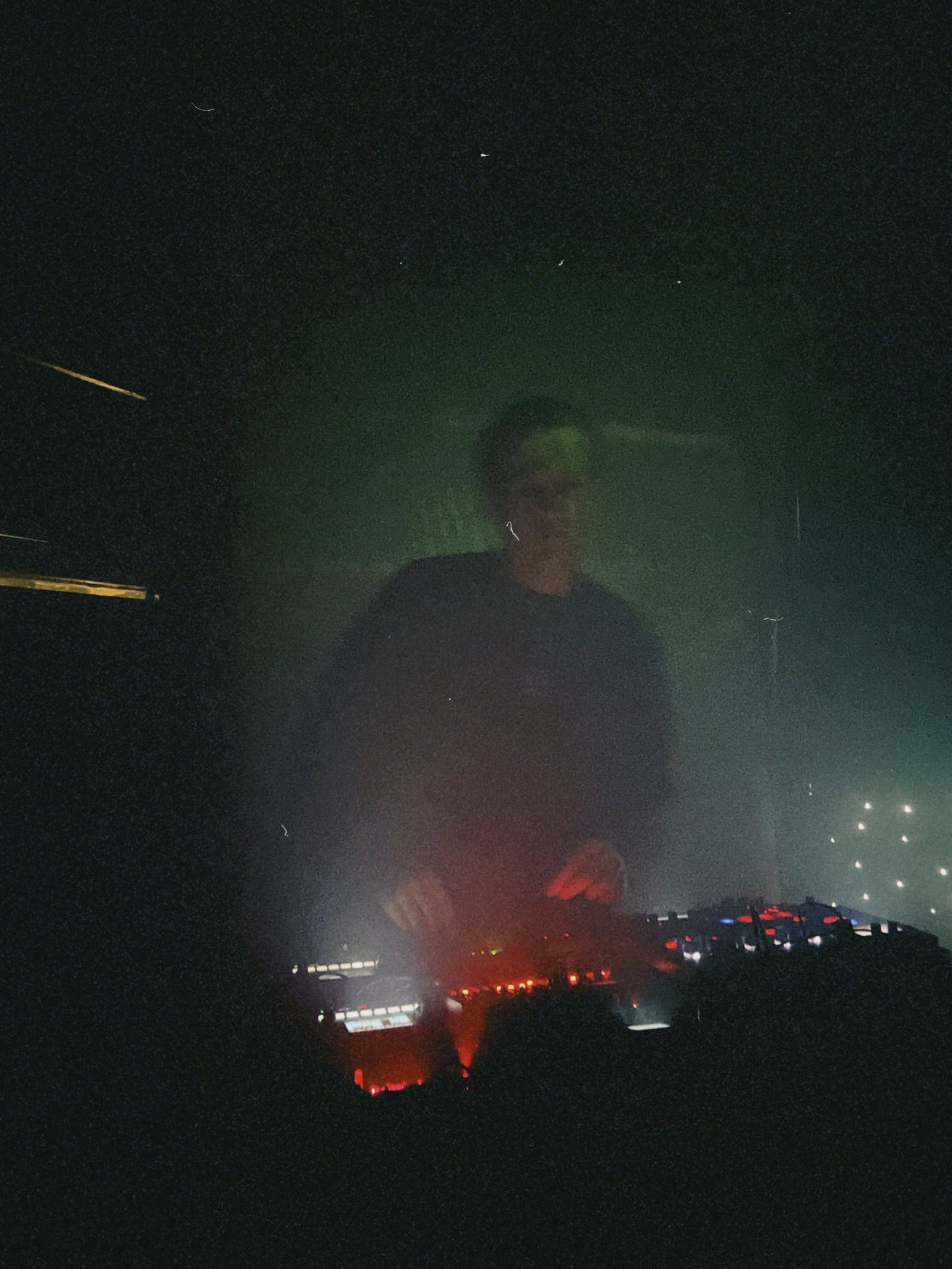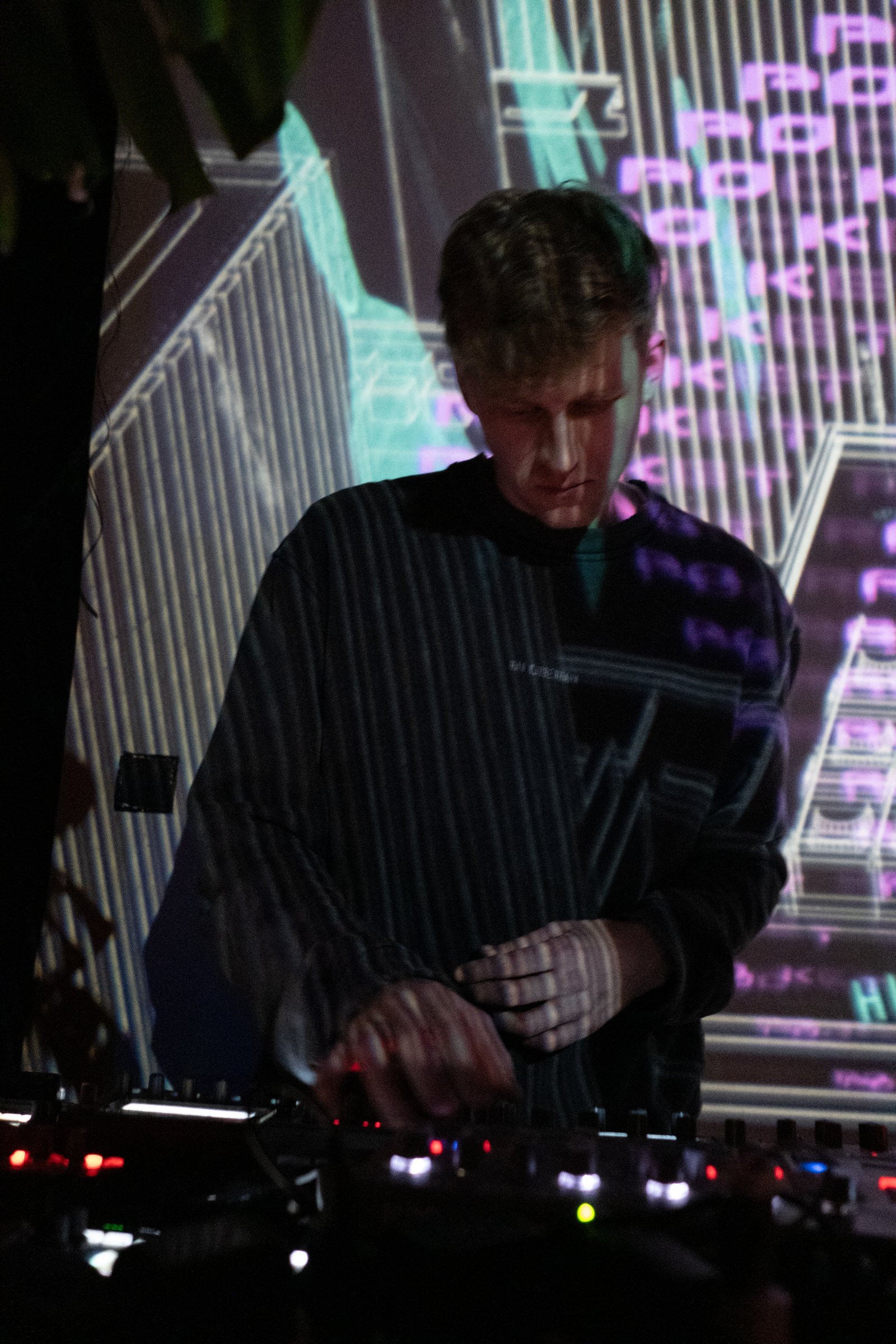
Raw, textured electronic music on a fully hardware setup. Kraków-based.

/home/bio.txtlive // hardware

Pocket Rave is a Kraków-based act delivering raw, textured electronic music on a fully hardware setup — synthesizers, sequencers, drum machines, and samplers. Each set is shaped in real time, somewhere between a live jam and a studio session, moving through hypnotic techno, electro, acid, breakbeat, and trance — staying emotional, physical, and a bit unpredictable.

Over the last years, he has performed at B-Side, Sekta Selekta, Kiosk, Święta Krowa, Pacura Studios, Prozak 2.0, Scena Chmielna; and at big festivals — Belarus Outside Soundsystem, Varušniak, and LTCŃ.

You can also spot him speaking on a Radio Plato editorial, a UkrainaTV live, and Duszno podcast.

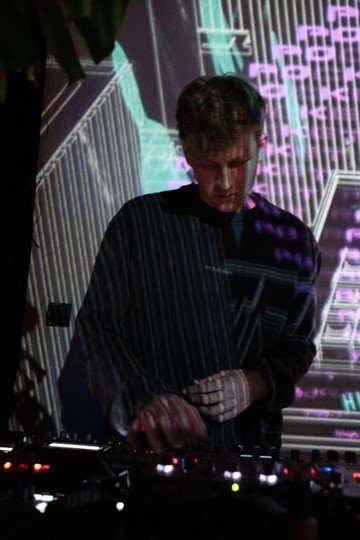
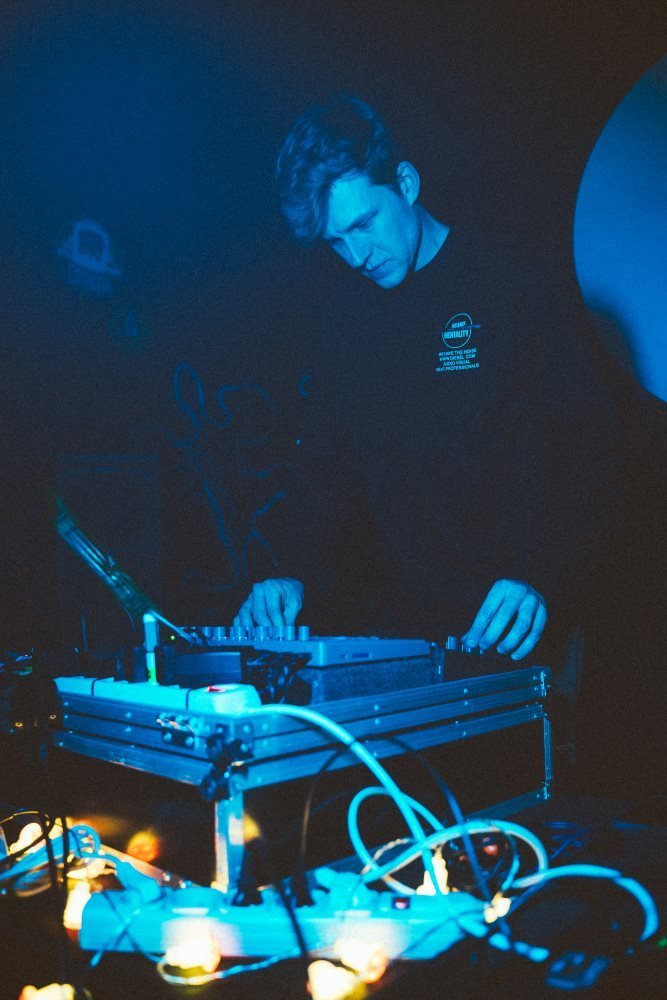
Pocket Rave performing live behind a hardware setup, projected visuals behind him
CAM_03 // live
BaseKraków, PL
FormatLive act, 100% hardware
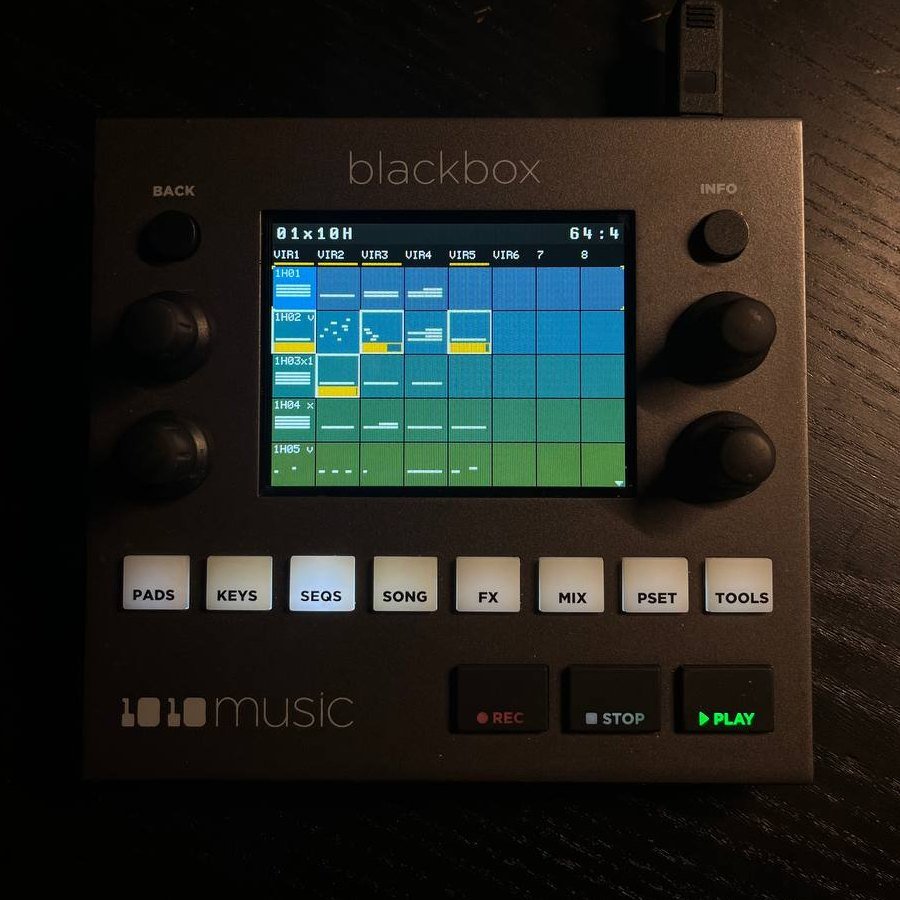
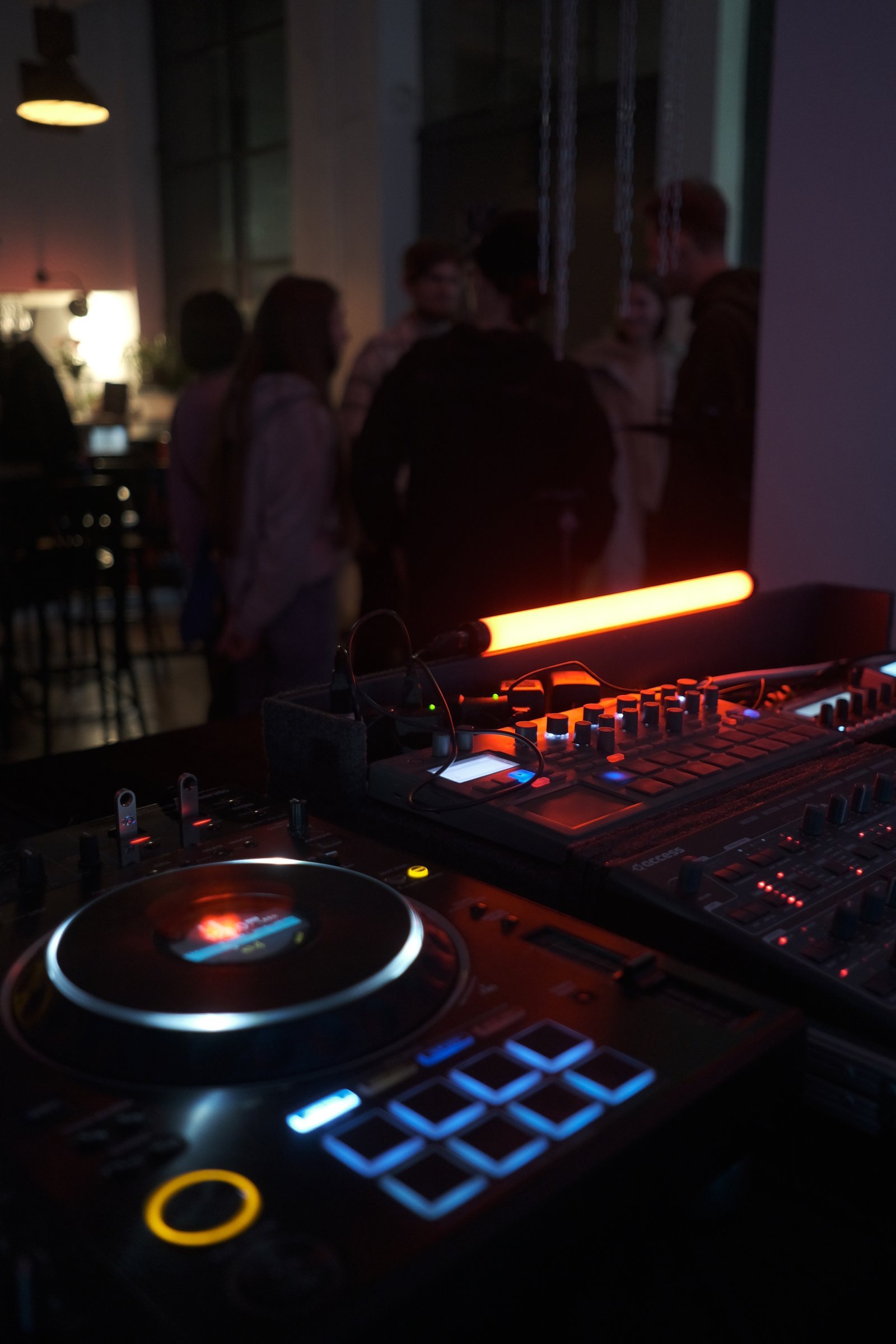
RigAccess Virus TI · Korg Electribe · Erica Synths LXR-02 · 1010music Blackbox · 1010music Bluebox
SoundHypnotic techno · electro · acid · breakbeat · trance
Sounds like
  • B-Side
  • Sekta Selekta
  • Kiosk
  • Święta Krowa
  • Pacura Studios
  • Prozak 2.0
  • Scena Chmielna

Projects

// memory dump: festivals, series, installations, code

0x01 // blackbox2026 — till now

BLACKBOX

open sourcefirmware · sequencer · live performance

Extends the capabilities of the standard 1010music Blackbox sampler and sequencer, adding functionality shaped around a personal way of perceiving and playing music live. Patches the original software, layering new features on top of it.

Fully open source: the source code lives on GitHub, and the firmware can be patched right in the browser with the BLACKBOX patcher.

Read more >

Independent project, not affiliated with or endorsed by 1010music.

  • 1010music blackbox
  • firmware patch
  • sequencer
  • open source

Developer · Performer
0x02 // ltcn-art-picnic2021 — 2026

Art picnic LTCŃ

Krakówfestival · music · installation · VR

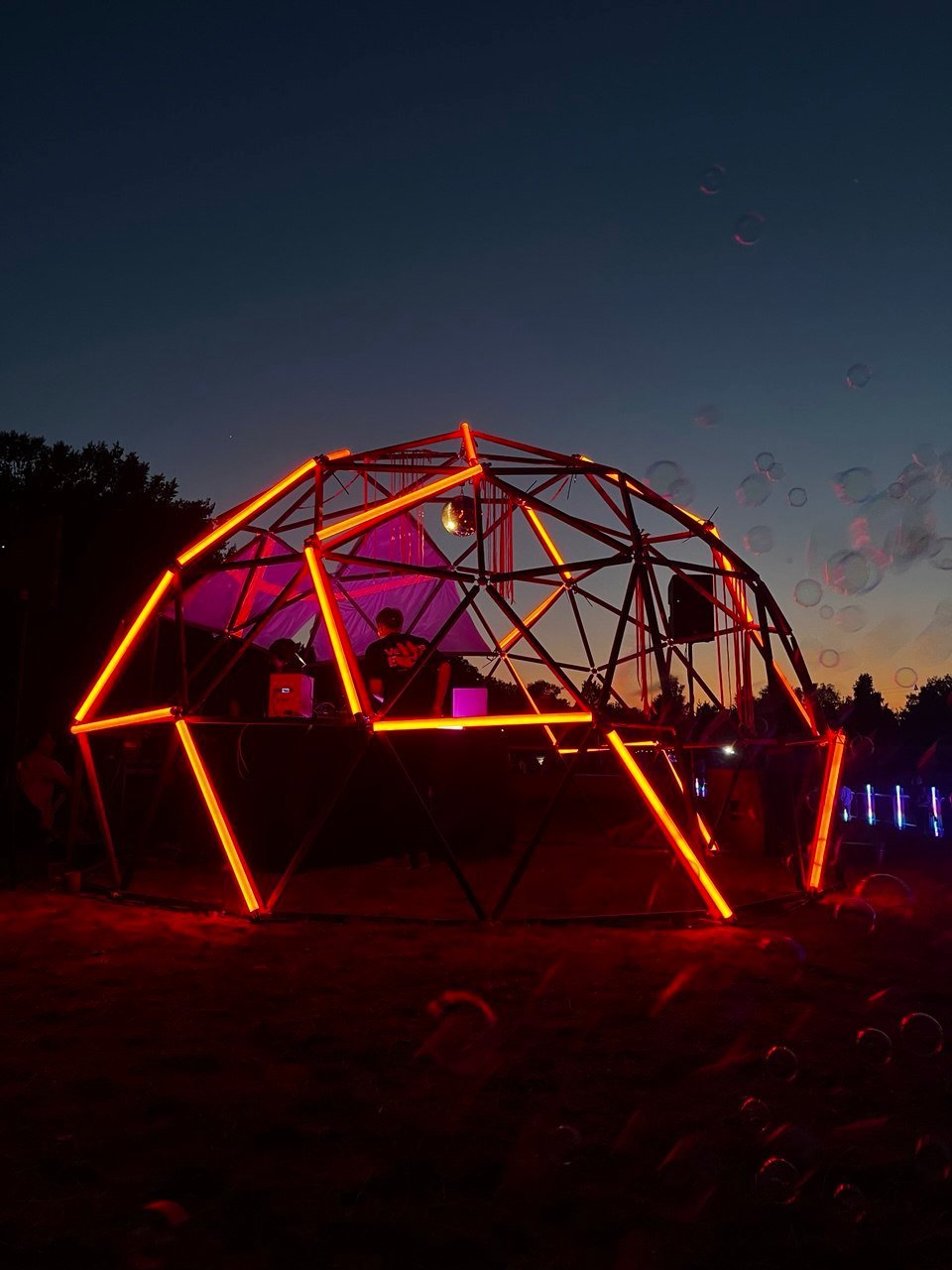
Shaped the festival's electronic music vision from concept to execution — budgeting, curation, and full production of the Geodome's scenic construction and content design. Curated the line-up of DJs, musicians, multidisciplinary artists, and game designers; directed an immersive VR space and the real-life stage design.

In 2024, launched a dedicated Letucień scene at the Warsaw fest and a VR experience where visitors explored the festival space in-headset and experienced live artists and DJ performances streamed inside the virtual environment. Oversaw every layer of the electronic scene: from the initial concept and spatial design to the implementation of scenic constructions, the engineering of the Geodome, and the production of all visual and sonic content.

The VR space became a parallel dimension of the festival — a place where audiences could navigate the grounds in real time and tune into live streams of performances, blurring the line between physical presence and virtual participation.

  • live act
  • art installation
  • VR space
  • geodome
  • engineering
  • budgeting

Co-organizer · Artist · Performer · Coordinator

0x03 // electronic-live-sessions2023 — 2025

Electronic Live Sessions

Krakówclub · music · community

Started up a series of techno events, Electronic Live Sessions, in Kraków. Now shapes the project and consistently selects Poland-based live performers and electronic artists from Belarus, Poland, and Ukraine to play together, network, exchange experiences, and popularize live electronic music.

  • live act
  • organization
  • hardware electronic artists
  • live techno acts

Co-organizer · Artist · Performer · Coordinator

0x04 // pocket-visuals2023 — 2025

Pocket Visuals VJ installations

Kraków, Warsawlive visuals · live coding

Creates dynamic generative visuals via Python programming. Performs across Poland, using a portable video synthesizer.

  • VJ
  • visual programming
  • python
  • pygame
  • eyesy

Artist · Performer · Programmer · VJ

0x05 // dzichkamusic2018 — 2024

dzichkamusic installation

Minsk, Kraków, Warsawfestival · installation · engineering

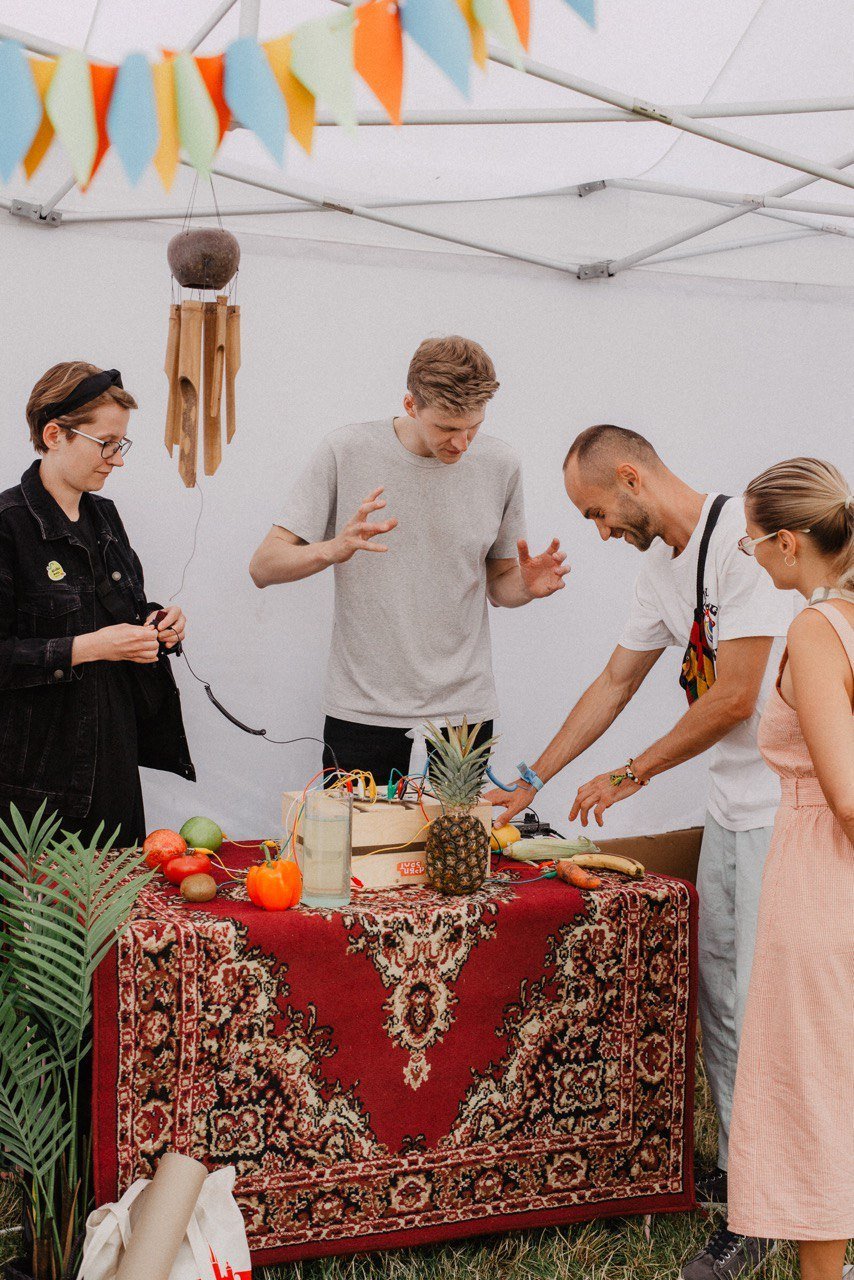
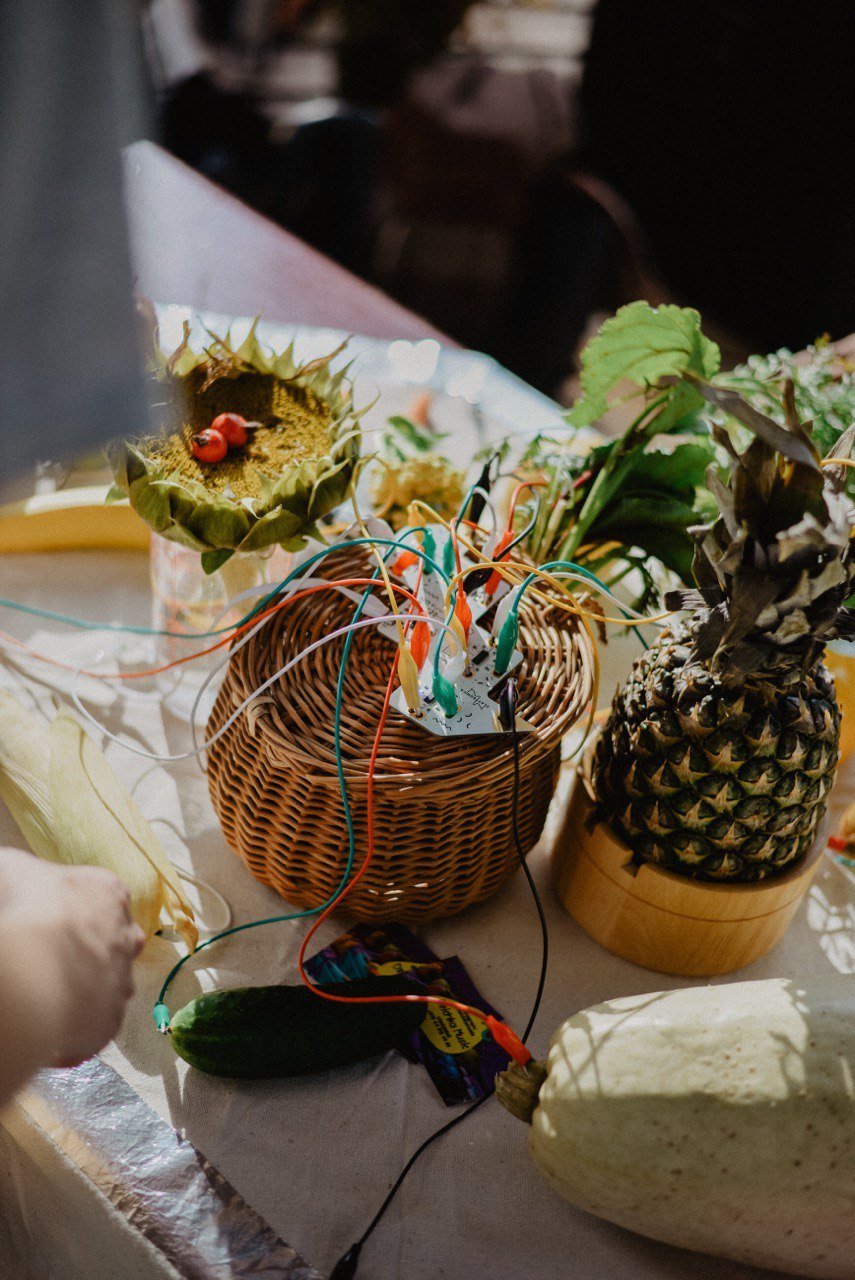
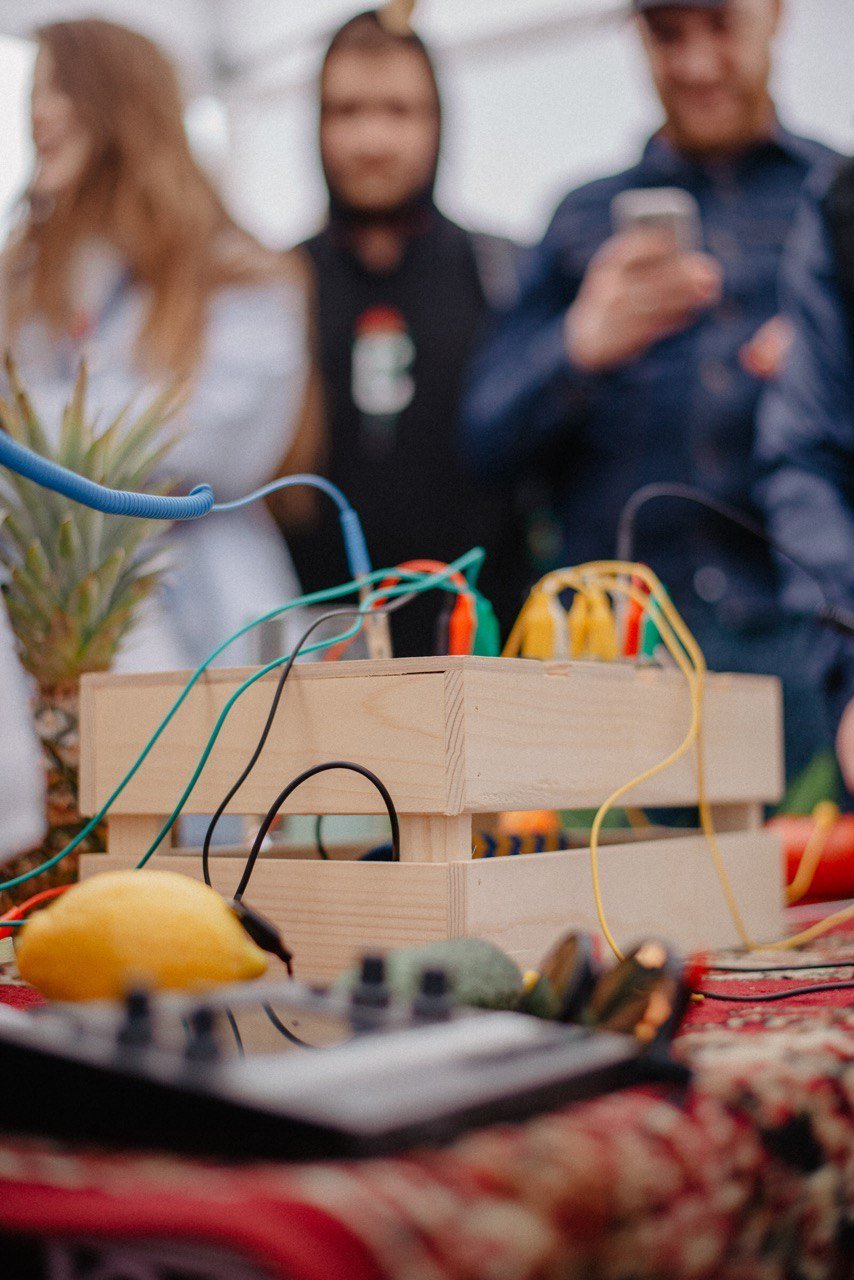
Dzichkamusic is a collective intuitive musical improvisation on fruits. The set usually represents an installation on a table. As the main theme plays, the participants add their own melody by touching the fruits, plants, and bowls of water connected to a MIDI module.

  • musical improvisations
  • sound design
  • interactive installation
  • playtronica

Artist · Composer · Performer · Programmer · Gardener
0x06 // live-electronic-jams2021 — 2025

Live Electronic Jams

Krakówclub · home · community

Collective electronic musical improvisations.

  • electronic musical improvisations
  • sound design
  • jam sessions
  • curation

Coordinator · Organizer · Performer
projects / blackbox

BLACKBOX

// firmware mod for the original 1010music Blackbox · release 3.1.9(70)

0x00 // readme2026 — till now

An unofficial mod for the original 1010music Blackbox, applied on top of the stock 3.1.9 firmware. It turns the SEQS screen into an 8 × 10 clip launcher and adds per-clip timing for polyrhythms, column settings and names, MIDI control of presets and clips, quantized preset changes, a send page for the effects with MIDI CC on the sends, steps down to 1/128, a colour and a label for every clip, a MIDI-in indicator, a colour-blind-safe palette and a sharper font. It is built around a personal way of perceiving and playing music live: everything on stage happens on one screen.
The mod patches your own copy of the stock firmware: patch it in the browser (the file never leaves your computer) or build it from the open-source code on GitHub.

Independent project, not affiliated with, endorsed by or supported by 1010music. "1010music" and "Blackbox" are trademarks of 1010music LLC. Use at your own risk: modified firmware may affect your warranty. Tested on one unit.

  • stock 3.1.9 + mod
  • MIT licence
  • diff-only patch
  • reversible
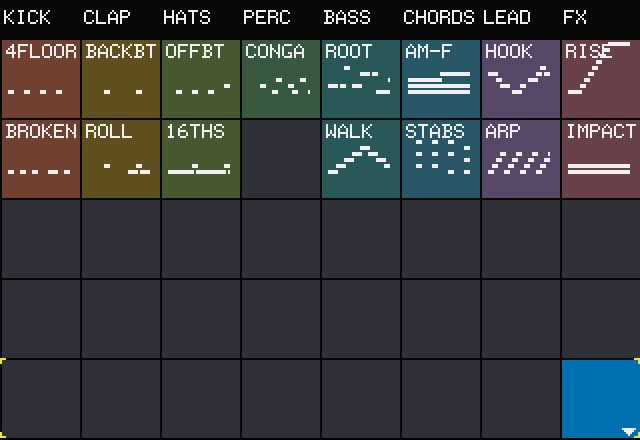
Modded SEQS screen: 8 named columns of clips with mini note previews
SEQS // the clip launcher

Screenshots: release v064 (v070 for the colour, label and MIDI-in blocks) running in an emulation of the Blackbox (Renode), with Pocket Rave's live presets plus demo notes and the SHOWCASE demo preset. The header bar is cropped off most of them.

0x01 // prch quantmidi preset change on the bar

Quantized preset changes

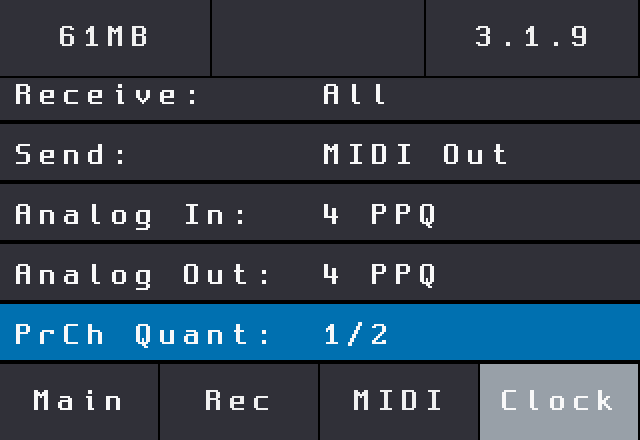
Switch presets from a MIDI controller in the middle of a set without breaking the groove. A new PrCh Quant setting on TOOLS › Clock holds the change until the next musical boundary, so the new preset comes in on the bar instead of mid-phrase. While it waits, the header turns red and shows OLD>NEW; outside a switch it shows the current preset name instead of "Seq N".

Set it up

  1. TOOLS › MIDI: set Global In to the channel your controller sends on (or Omni).
  2. TOOLS › Clock: set PrCh Quant, e.g. 1 bar. It is saved with the other settings and kept across power cycles.
  3. Press PLAY, then send a note-on from the controller:
110next preset in the PSET list
109previous preset

Presses add up while a switch is pending: 110 three times jumps three presets ahead. With the transport stopped the boundary never comes, so the switch waits for PLAY; set PrCh Quant to None to switch immediately.

Values8 bars · 4 bars · 2 bars · 1 bar · 1/2 · 1/4 · 1/8 · 1/16 · None
DefaultNone (switch immediately)
  1. 11:2 // note 110 arrivesE08 MM11:2
  2. waiting for the barE08 MM>E10 KO11:4
  3. 12:1 // switched on the downbeatE10 KO12:1
illustration // PrCh Quant: 1 bar
TOOLS Clock page with the PrCh Quant row
TOOLS › Clock // PrCh Quant
0x02 // clip launchertap · quantize · scroll

8 × 10 clip launcher

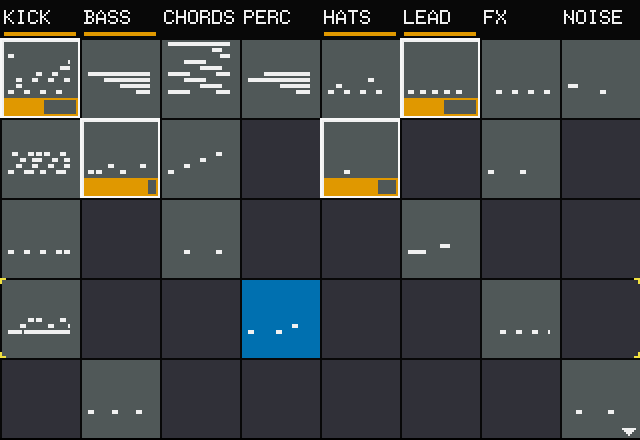
SEQS becomes a clip launcher: 8 columns (instruments) of 40 px tiles across the full width, split by 1 px lines, with a header row for the column names. The Blackbox boots straight into SEQS instead of PADS.

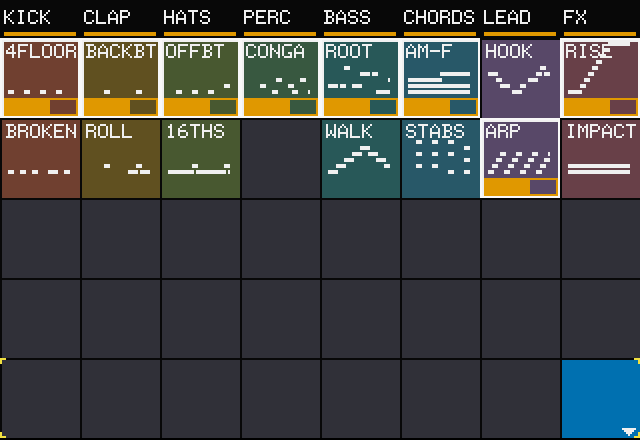
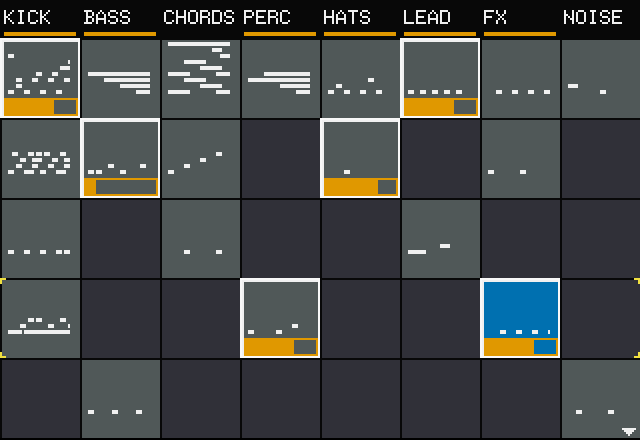
Each column is one instrument and plays one clip at a time, like a track in a session view. Tap a clip to launch it: it waits for the clip's Quant Size boundary (a white frame while pending), then plays with a white frame and a progress bar along its bottom edge. Launching another clip in the same column replaces the playing one; tap the playing clip, or the column's header, to stop it. Empty clips only get selected.

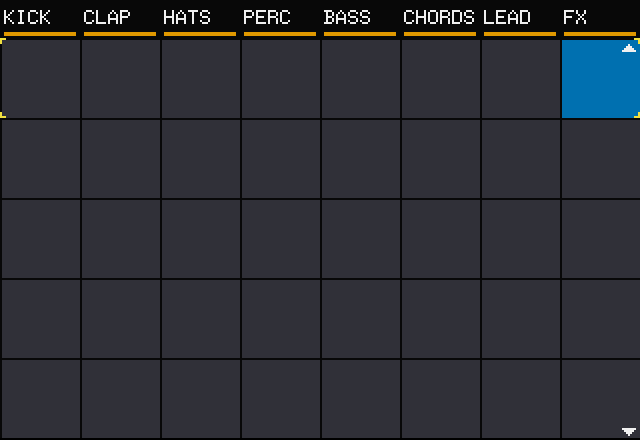
Five rows are visible; the bottom-right knob scrolls to rows 6–10, and small triangles at the right edge show when rows are hidden above or below. The top-left knob moves the selection between rows, the top-right knob between columns.

Taplaunch / stop the clip, and select it
Long pressclip menu: CLEAR / UNDO
Header tapSTOP: stop the column, and select its header
INFOopen the selected clip in the piano roll
BR knobrows 1–5 / 6–10
TL / TRmove the selection: rows / columns
  • boots into SEQS
  • 8 columns × 10 rows
  • full-width 40 px tiles
Clips waiting to launch, framed in white
tapped: white frame = waiting
Playing clips with white frames and progress bars
playing: progress bars
Rows 6 to 10 of the clip grid
BR knob: rows 6–10
0x03 // trig conditionschance · a:b · pre · 1st · fill

Chances and conditional trigs

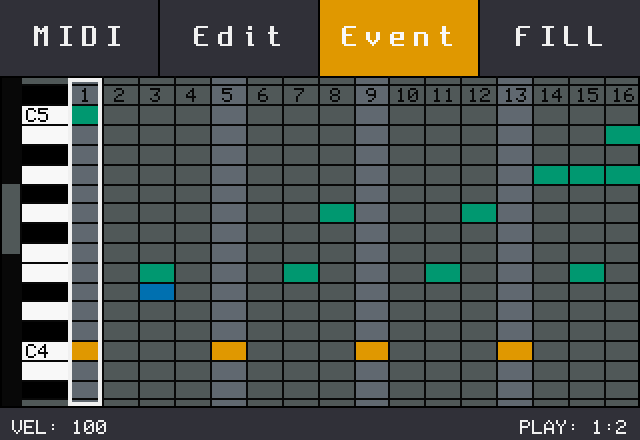
Every note can carry a condition that decides, loop by loop, whether it plays: Elektron-style trig conditions on the Blackbox. Open a clip in the piano roll, tap Event, select a note and turn its PLAY: value.

Alwaysthe default: the note always plays
1% – 99%chance: the note plays with that probability, rolled every loop
A:Bplays on loop A of every B loops: 1:2 2:2 · 1:3 – 3:3 · 1:4 – 4:4 · 1:8 – 8:8
1ST / -1STonly on / never on the first loop after the clip is launched
PRE / -PREplays if the previous conditional note in the column played / did not play
FILL / -FILLplays only while FILL is on / only while it is off (next block)

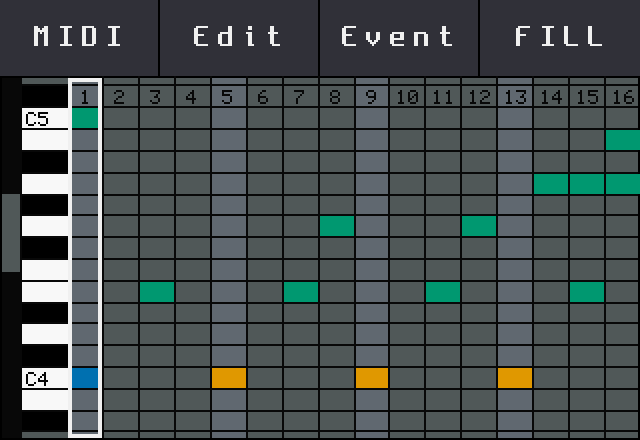
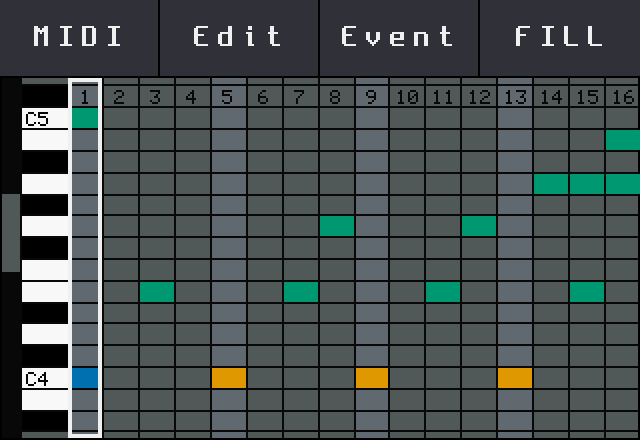
Notes with a condition or a chance are drawn in bluish green in the piano roll, so you see them at a glance. Loop counters start when the clip is launched. In one-step clips conditions are off (chances still roll).

example // kick on 1, 5, 9, 13 always; off-beat hats at 1:2 (every other loop); a ghost note at 50%; a crash at 1ST so it only hits when the clip comes in; a roll on steps 14–16 at FILL.

Stored in the note's stock condition byte: presets keep their format, and stock firmware plays these notes always.

Piano roll: notes with conditions in bluish green, plain notes in orange
green = condition / chance
Event mode: the selected note's PLAY value at the bottom right
Event // PLAY: condition
0x04 // fillback · piano roll · midi 119 – 126

FILL

FILL switches the FILL / -FILL notes of a clip: with fill on, FILL notes play and -FILL notes rest. Use it for drum rolls, breaks and turnarounds that only come in when you ask for them.

SEQS screenhold BACK: fill for the highlighted clip, as long as you hold it (momentary)
Piano rollFILL button: latches fill on / off for the clip's column
MIDI 119 – 126fill for columns 1 – 8 in the selected row, while the note is held

Fill acts only on a clip that is playing: BACK on the highlighted clip, MIDI on the clip of the selected (cornered) row. While fill is on, a clip with FILL notes turns bluish green. On SEQS a long BACK no longer turns the screen off, so you can hold it through a whole fill.

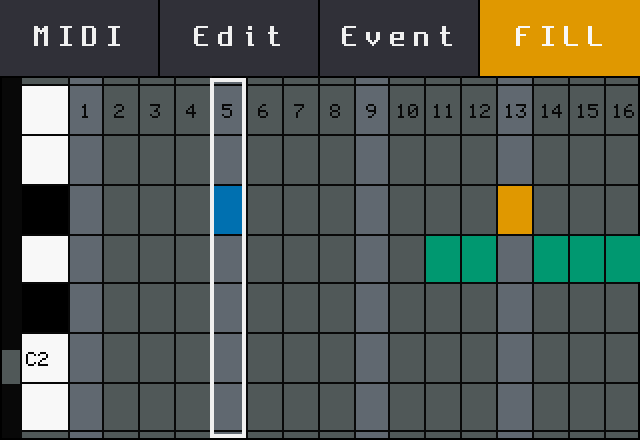
example // the SHOWCASE preset's CLAP › ROLL clip plays the backbeat always; its snare roll on steps 11–16 has the FILL condition, so it comes in only while BACK is held or FILL is latched.

SEQS: the highlighted playing ROLL clip turns bluish green while BACK is held
BACK held: fill on
Piano roll of the ROLL clip: toolbar with FILL lit, the FILL notes in bluish green
piano roll: FILL latched
0x05 // clip menulong press

CLEAR / UNDO on a long press

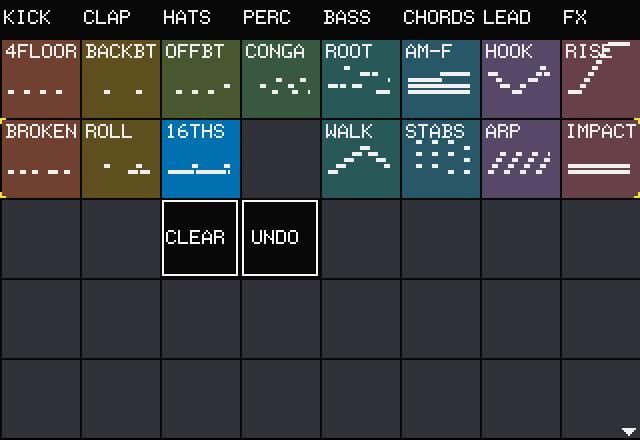
Hold a clip for 0.4 s: it gets selected (without launching) and two buttons open next to it. CLEAR empties that clip only, including the copy that is playing. UNDO is the stock undo. Any tap closes the menu.

CLEAR and UNDO buttons below the selected 16THS clip
clip menu
0x06 // columnsheader row

Column headers and settings

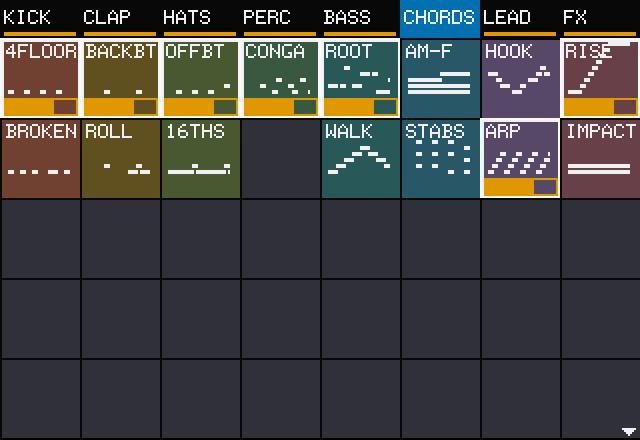
The header row is a row of STOP buttons: a tap stops the column and selects the header (it flashes yellow, then stays blue). The top-left knob moves from row 1 up onto the headers. While a column is playing, an amber line runs above its header.

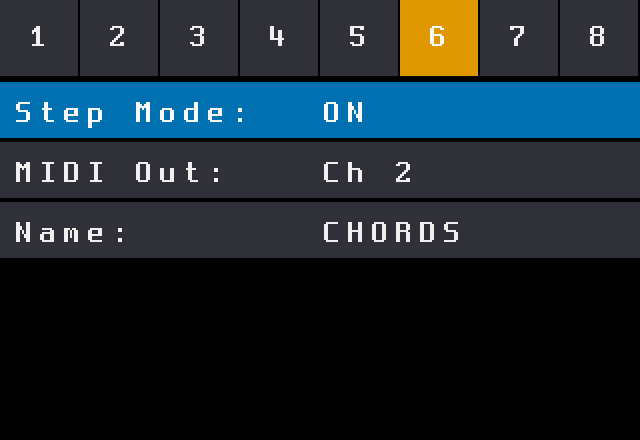
A long press on a header, or INFO while it is selected, opens the column page:

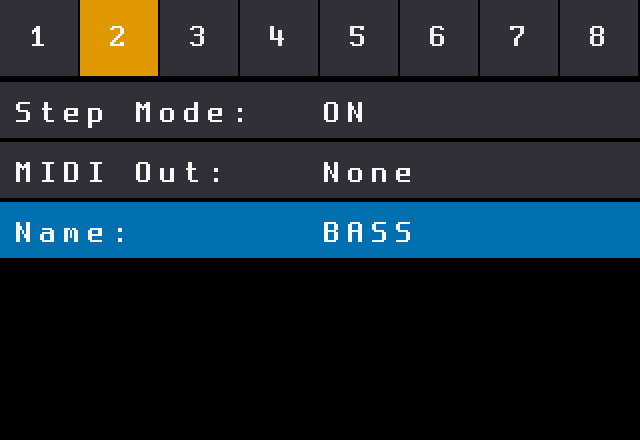
Step Modethe stock Step Mode, set once for the whole column
MIDI OutMIDI output channel of the column (instrument)
Nameup to 6 characters, typed on the stock keyboard (BR knob or INFO)
CHORDS column playing, amber line above its header
CHORDS playing
CHORDS header tapped: column stopped, header selected in blue
header tap: stopped
Column page with Step Mode, MIDI Out and Name rows
column page
0x07 // namesstock keyboard

Name your columns

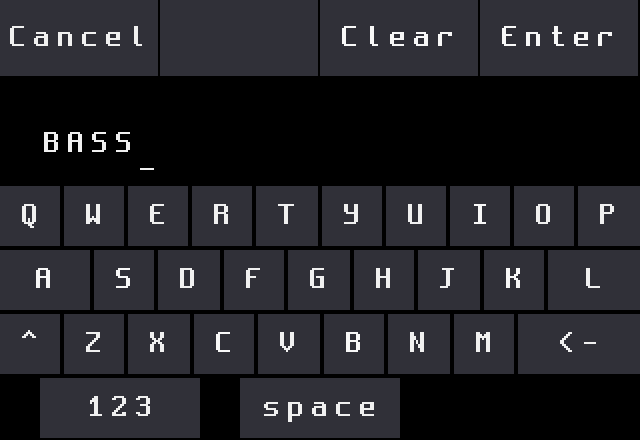
On the Name row, press INFO or turn the bottom-right knob and the stock on-screen keyboard opens with the current name. Enter saves the first 6 characters, Cancel keeps the old one. Names are stored in the preset, so every set keeps its own labels.

example // long press header 2 → Name → type BASS → Enter → the header reads BASS.

Stock on-screen keyboard with BASS typed
typing BASS
Column page showing the new name
saved on the column page
0x08 // clip colour · labelinfo × 2 › colour · label

A colour and a label for every clip

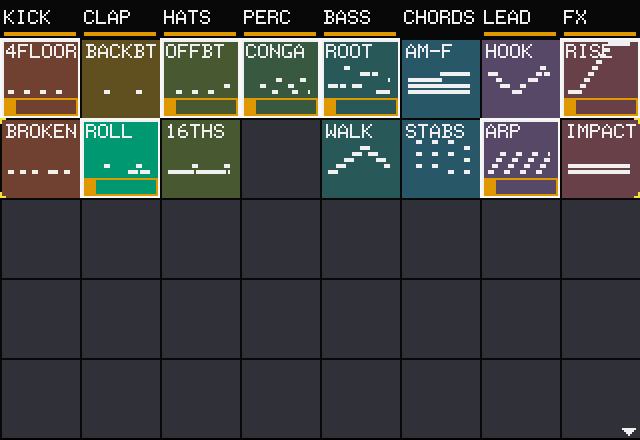
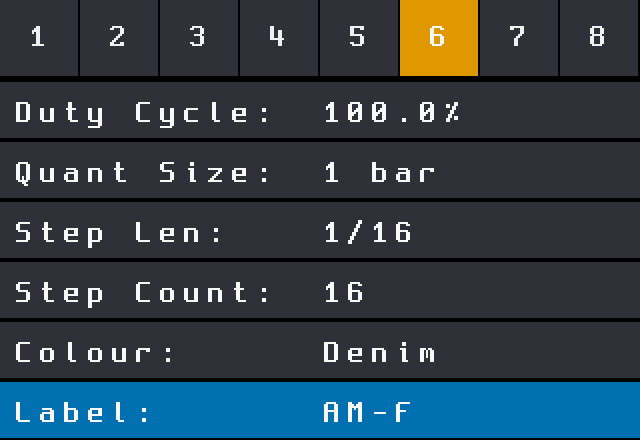
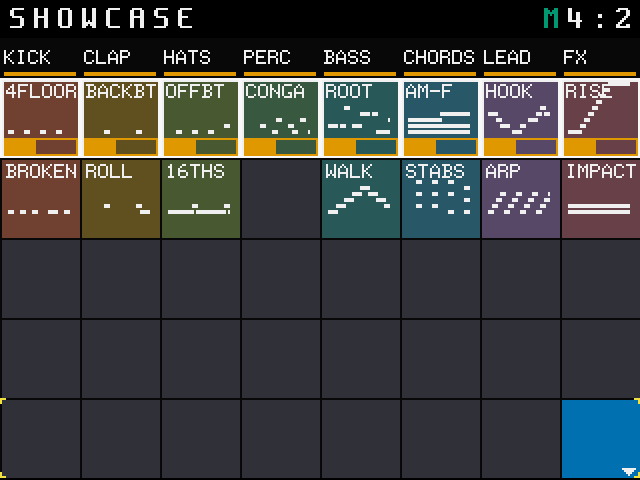
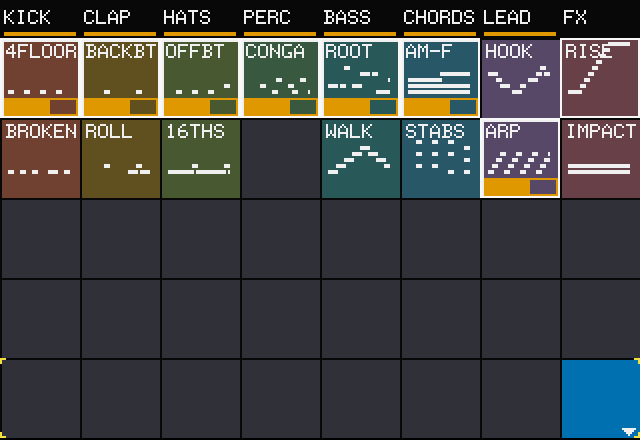
The clip page (INFO twice on a clip) has two new rows under Step Count. Colour fills the clip's tile on the grid with one of 10 muted colours. Label writes a short name in white at the tile's top-left, typed on the stock keyboard. Give every instrument its own colour, name the variations, and the whole set reads at a glance from across the stage.

ColourDefault + 10 colours; the tile is filled even when the clip is empty
Labelup to 8 characters (6 sit inside the tile); INFO or the BR knob opens the keyboard, Enter saves, Cancel keeps the old one
Slate Denim Teal Sage Moss Ochre Clay Rose Mauve Plum

Colour and label are saved in the preset and survive CLEAR. Editing them (or a column name) marks the preset as modified, so PSET Save is enabled. The selected clip still shows blue, and a clip in FILL still turns bluish green. Older presets load with no colours and no labels.

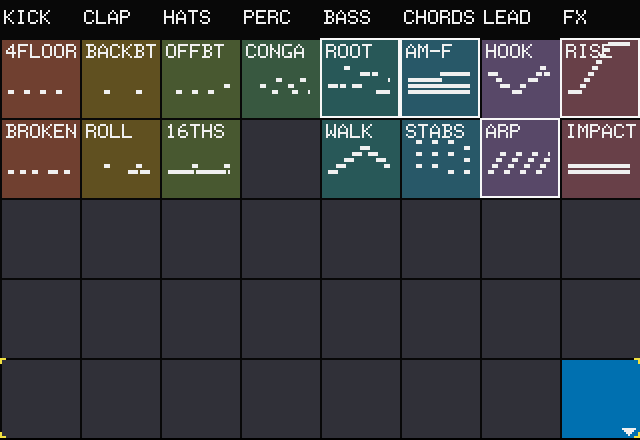
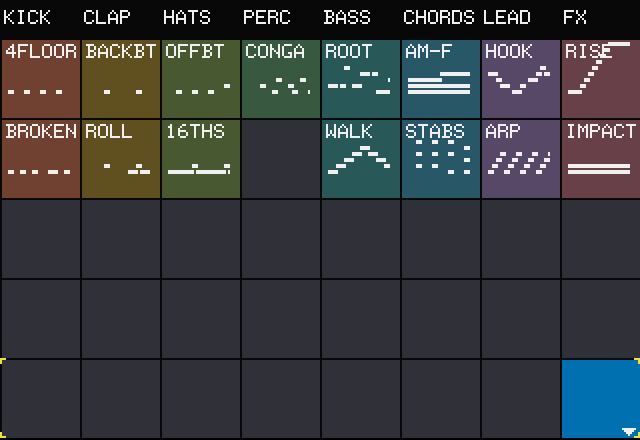
example // the SHOWCASE preset: one colour per instrument, from Clay on KICK to Rose on FX, and two labelled variations per column — 4FLOOR / BROKEN, ROOT / WALK, HOOK / ARP.

SEQS grid: eight named columns, each with its own clip colour, and white labels on the clips
SHOWCASE // one colour per column
Clip page with the Colour row set to Denim and the Label row set to AM-F
clip page: Colour + Label
Coloured clips playing with progress bars
playing
0x09 // per-clip timingpolyrhythm

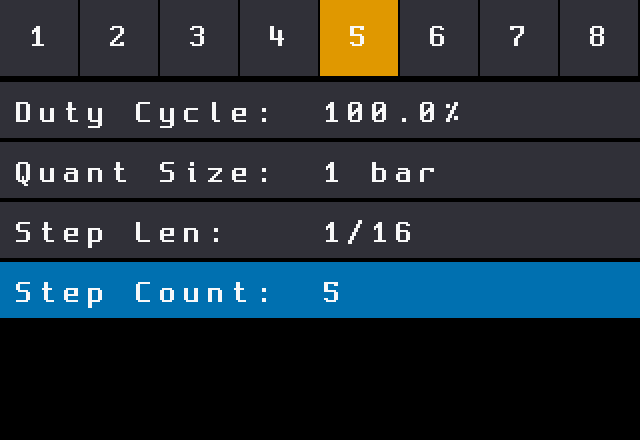
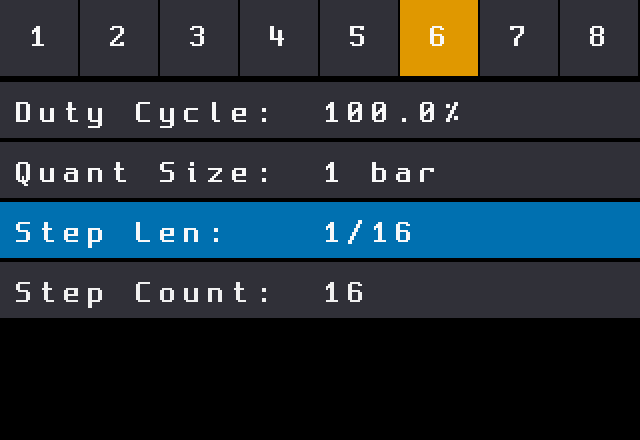
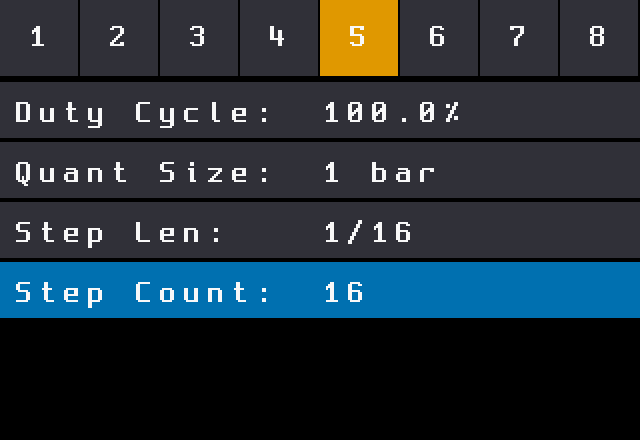
Per-clip Duty, Quant, Step Len, Step Count

In stock firmware these belong to the whole cell. In the mod every clip has its own. INFO on a clip opens the piano roll; INFO again opens the clip page:

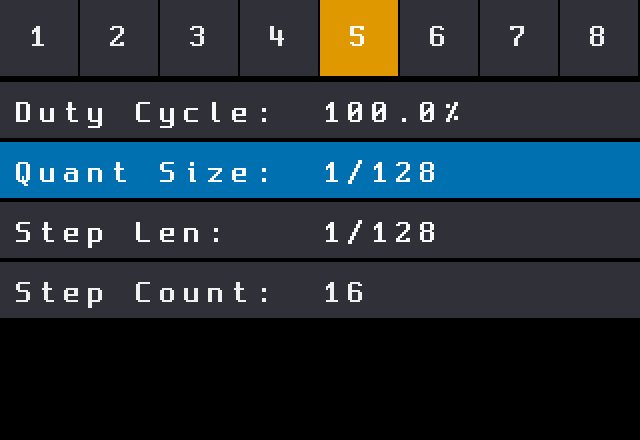
Duty Cyclenote length of the clip
Quant Sizethe boundary the clip launches and restarts on
Step Lenlength of one step, down to 1/128 (next block)
Step Countnumber of steps; notes past it don't play

example // a 5-step hi-hat clip against a 16-step kick: on the hats set Step Len 1/16, Step Count 5 and Quant Size 1/16. They loop every 5 steps with no gap, drift against the kick's bar and line up again every 80 steps. Set Quant Size back to 1 bar and the hats wait for the bar after each 5 steps.

Old presets are converted once on load: each clip copies its cell's pattern-A values.

Clip page of the HATS clip in row 2: Step Count 16
HATS clip: Step Count 16
Clip page with Step Count set to 5
BR knob: Step Count 5
0x0A // editor1–8 selector

Jump between columns while editing

On the clip and column pages the top row becomes a 1–8 selector: tap a number to jump to the same row's clip (or the column page) of another column, without going back to the grid. BACK still returns where you came from. A pressed button lights sky blue.

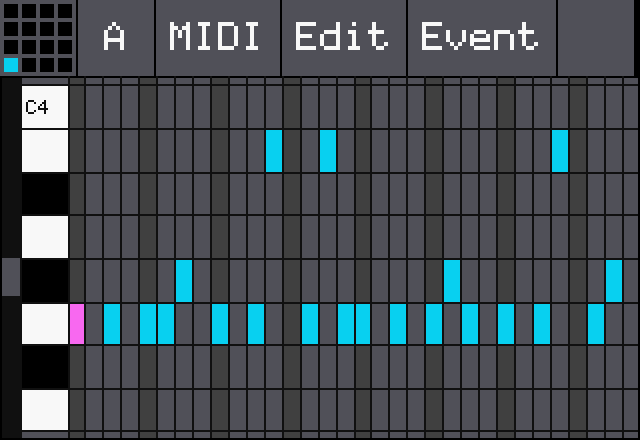
The piano roll's top row becomes one gapless toolbar: MIDI, Edit, Event and FILL (plus the pad miniature in KEYS mode). The stock sequence miniature and pattern letter, which don't apply to clips, are gone.

Clip page after tapping 6 in the selector
tapped 6: column 6's clip
Stock piano roll with the sequence miniature and the pattern letter A at the top left
stock piano roll
Modded piano roll without the miniature and the letter
mod piano roll
0x0B // midi clip launchnotes 111 – 126

MIDI clip launch

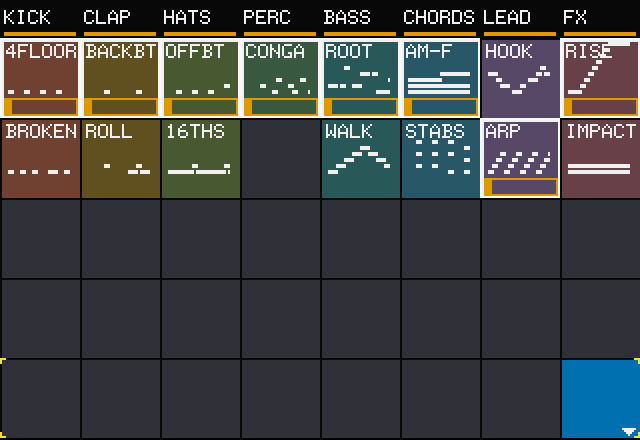
Notes 111–118 on the Global In channel launch or stop the clip of column 1–8 in the selected row, exactly like a tap on that clip. The selected row is marked with yellow corners at both ends of the grid, so a foot controller or a pad controller can fire a whole row of clips.

111 – 118launch / stop column 1 – 8 in the selected row
119 – 126FILL for column 1 – 8 in the selected row, while held
Selected row with yellow corners at both ends
selected row: yellow corners
Clips launched by MIDI notes in the selected row
notes 114 + 117: PERC and FX in row 4
0x0C // midi ingreen m

MIDI-in indicator

A green M lights up left of the bar counter for 150 ms each time a Note On, Note Off or CC arrives. A run of notes or a turning knob keeps it lit. It is the quick check before the first launch of the night: is the controller plugged in, and is it really sending?

Lights onNote On · Note Off · CC, on any channel
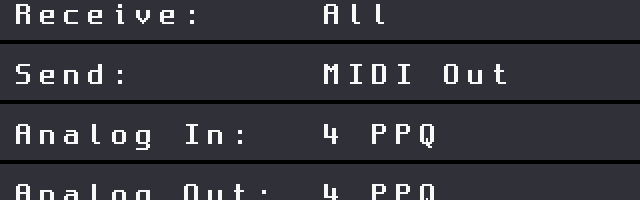
InputsMIDI IN (TRS) · USB-A host
Stays offclock · start / stop · active sensing · program change · pitch bend · aftertouch

Because clock doesn't light it, a DAW that only sends clock keeps the M dark. The M works in every view and with the transport stopped.

While a preset loads (about 1 s) the stock firmware drops incoming notes, so the M stays dark then.

SEQS screen with a green M left of the counter in the top bar
note in: green M at the counter
0x0D // fx sendsfx › sends · xy fx · eq

FX send page

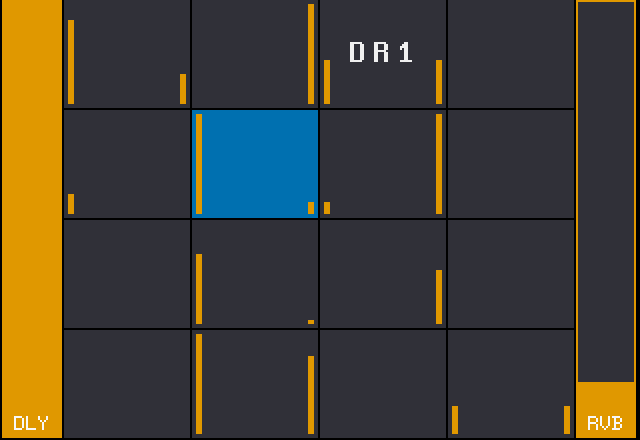
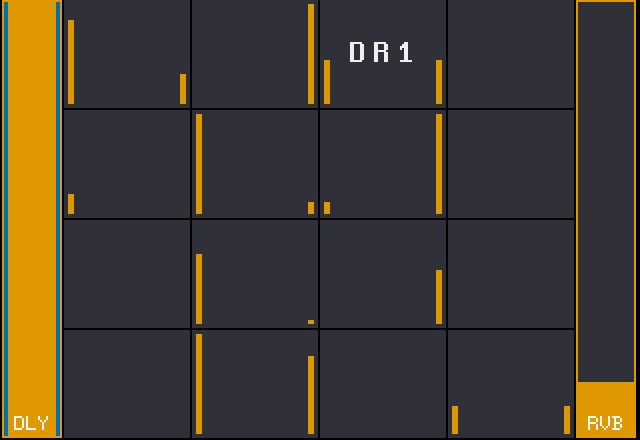
The FX button now opens a send page first; press it again for the stock XY FX and EQ pages. All 16 pads are on one screen, each with two small marks for its delay and reverb send, and the two effects run as full-height DLY and RVB bars down the sides. You see the whole send mix at a glance and change it without opening every pad.

BR / BLmove the selection over the pads and the two bars (stock blue)
Tapselect a pad or a bar
TL / TRset the selected pad's DLY / RVB send
INFO on a barthe stock settings of that effect
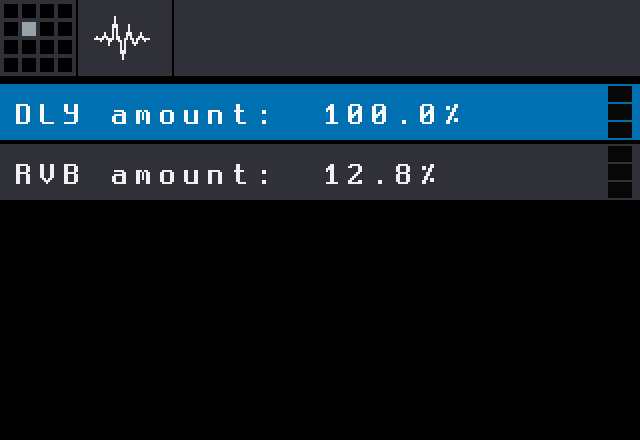
INFO on a pada short pad page with only DLY amount and RVB amount

The sends are the stock per-pad values: presets keep their format and play the same on stock firmware.

FX send page: 16 pads with send marks between full-height DLY and RVB bars
FX // the send page
DLY bar selected on the send page
BL: DLY bar selected
Pad page with only the DLY amount and RVB amount rows
INFO on a pad: the two sends
0x0E // midi cc sendssource: cc · learn · amount

MIDI CC on the sends

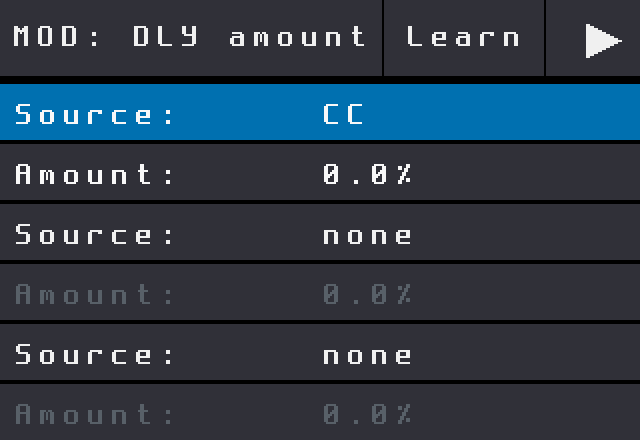
Throw a pad into the delay or the reverb from a knob on your controller. Each pad's send row has its own MOD page whose source list is reduced to none and CC, with Learn.

Set it up

  1. FX, select the pad, INFO: the pad page with DLY amount / RVB amount.
  2. Select a row, INFO: its MOD page. Turn Source to CC.
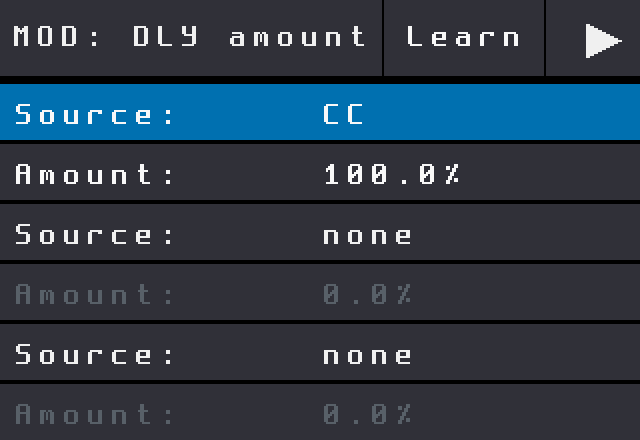
  3. Tap Learn and move the knob on your controller: the controller and its channel are stored.
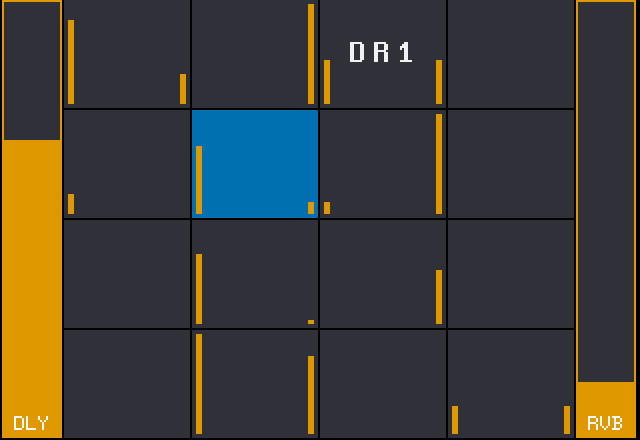
  4. Set Amount for the range, then BACK twice: the bar on the send page follows the knob.
Amount 100%the knob covers 0 – 100% of the send
Amount 50%the knob covers 0 – 50%
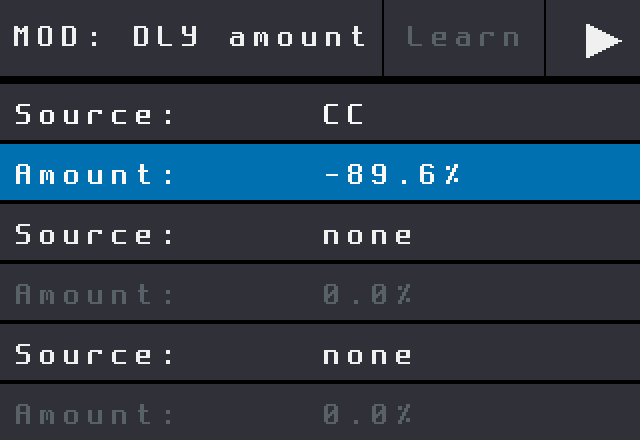
Amount −100%inverted: knob down = full send

One CC can drive several pads and both sends: learn the same knob on the hats' reverb and the snare's delay and one turn opens both. The mapping is saved with the preset; MOD pages of all other parameters keep the full stock source list.

example // learn one knob on RVB amount of the clap and the hats with Amount 100%, and on DLY amount of the lead with −100%: turning it up washes the drums into the reverb while the lead's delay dries out.

Known limits: only CC as a source; the CC writes the send value itself, so it and the knob on the page overwrite each other; Amount 0% sets the send to 0 on every CC.

MOD page of DLY amount with Source set to CC
MOD page: Source CC
MOD page after Learn: Source CC, Amount 100 percent
Learn: knob stored, Amount 100%
MOD page with Amount set to minus 89.6 percent
Amount −89.6%: inverted
Send page: the selected pad's DLY bar raised by the CC
send page: the CC moved DLY
0x0F // 1/128step len · quant size

Steps down to 1/128

Step Len and Quant Size on the clip page get two shorter values at the end of their lists: 1/64T and 1/128. A 16-step clip at 1/128 lasts half a beat (one 8th note): ratchets, buzz rolls and granular stutters straight from the sequencer, and with per-clip Step Count, very short loops against the rest of the grid.

Step Len8 bars · 4 bars · 2 bars · 1 bar · 1/2 · 1/2T · 1/4 · 1/4T · 1/8 · 1/8T · 1/16 · 1/16T · 1/32 · 1/32T · 1/64 · 1/64T · 1/128
Quant Size2 bars … 1/64 · 1/64T · 1/128

example // a 4-step hat clip at 1/128 and Quant Size 1/16 plays its 4 hits in the first half of each 16th, then waits for the next one: a tight ratchet on every 16th.

Clip page with Quant Size and Step Len both at 1/128
clip page: Quant Size + Step Len 1/128
0x10 // paletteokabe–ito

Colour-blind-safe palette

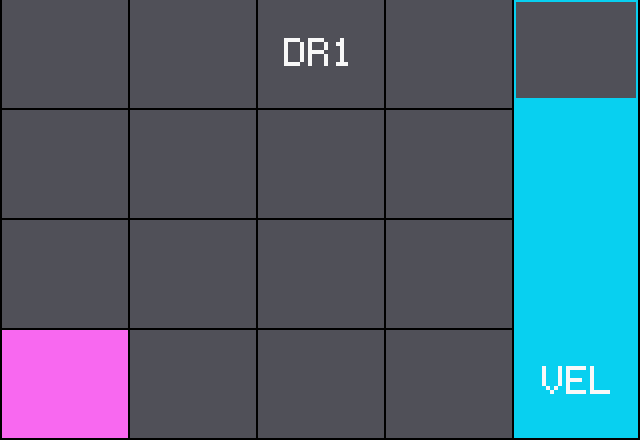
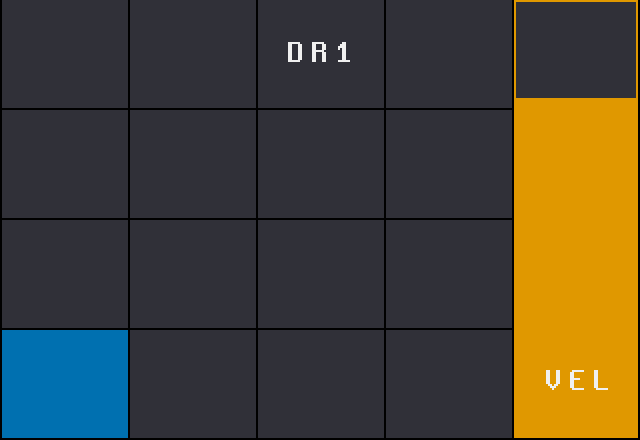
The UI colours are replaced with a scheme based on the Okabe–Ito palette, which stays distinguishable with the common types of colour blindness, and the scheme passes the mod's contrast checks. Dark gaps between cells, a separate lane grey for the piano roll and meters, and no more pink.

page cells lanes text selection accent waveform · pressed alert text multi-select + multi-select − markers
Stock PADS screen with pink and cyan
stock PADS
Modded PADS screen in the new palette
mod PADS
0x11 // fontspleen 8×16

Sharp large text

Stock draws its large text by doubling a 6×8 font, which gives blocky 2×2 pixels. The mod draws the same 12×16 cells with the native Spleen 8×16 font instead. Every width and layout stays identical; only the letters get sharper.

Stock doubled 6 by 8 font
stock
Spleen 8 by 16 font
mod
0x12 // splash3.1.9(NN)

Version on the splash

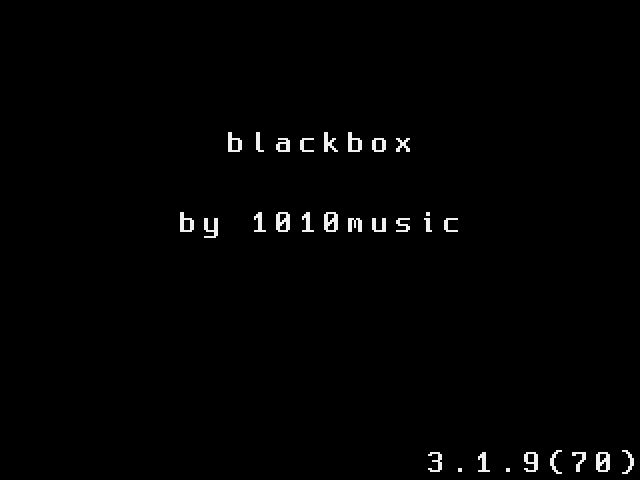
The boot splash shows 3.1.9(70): the stock version plus the mod release number, so you always know what is flashed.

Boot splash showing version 3.1.9(70)
boot splash

Live Acts

// signal: hypnotic techno / electro / breakbeat / trance

/live/latest.mp4latest set // the dome
/live/aboutbetween composition & improvisation

Pocket Rave often blurs the line between composition and improvisation, sculpting raw, textured sounds into a rich sonic scape. He guides his listeners on a rave journey through experimental and emotive electro, hypnotic techno, breakbeat, and trance tunes.

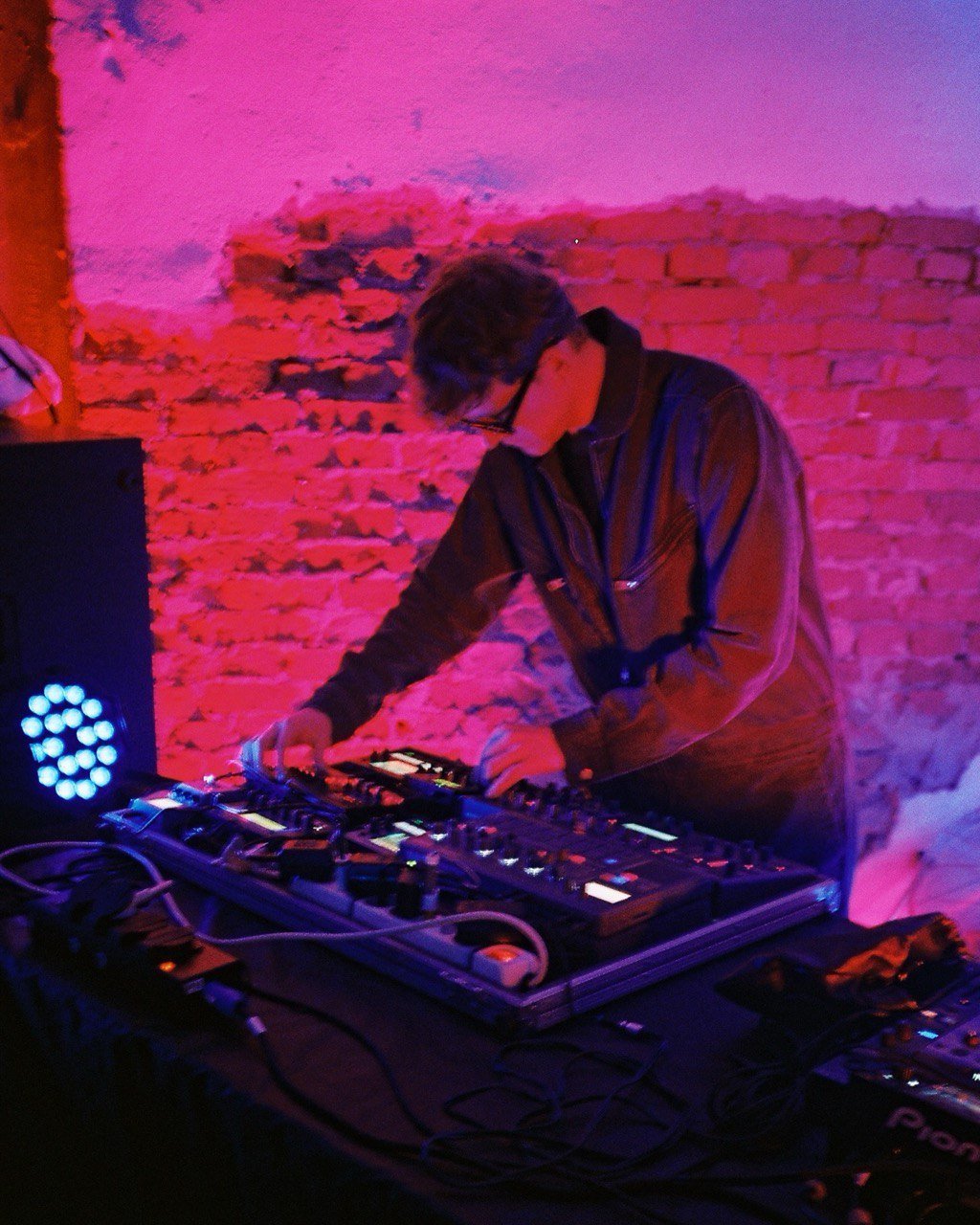
Pocket Rave playing synthesizers against a pink brick wall
CAM_04
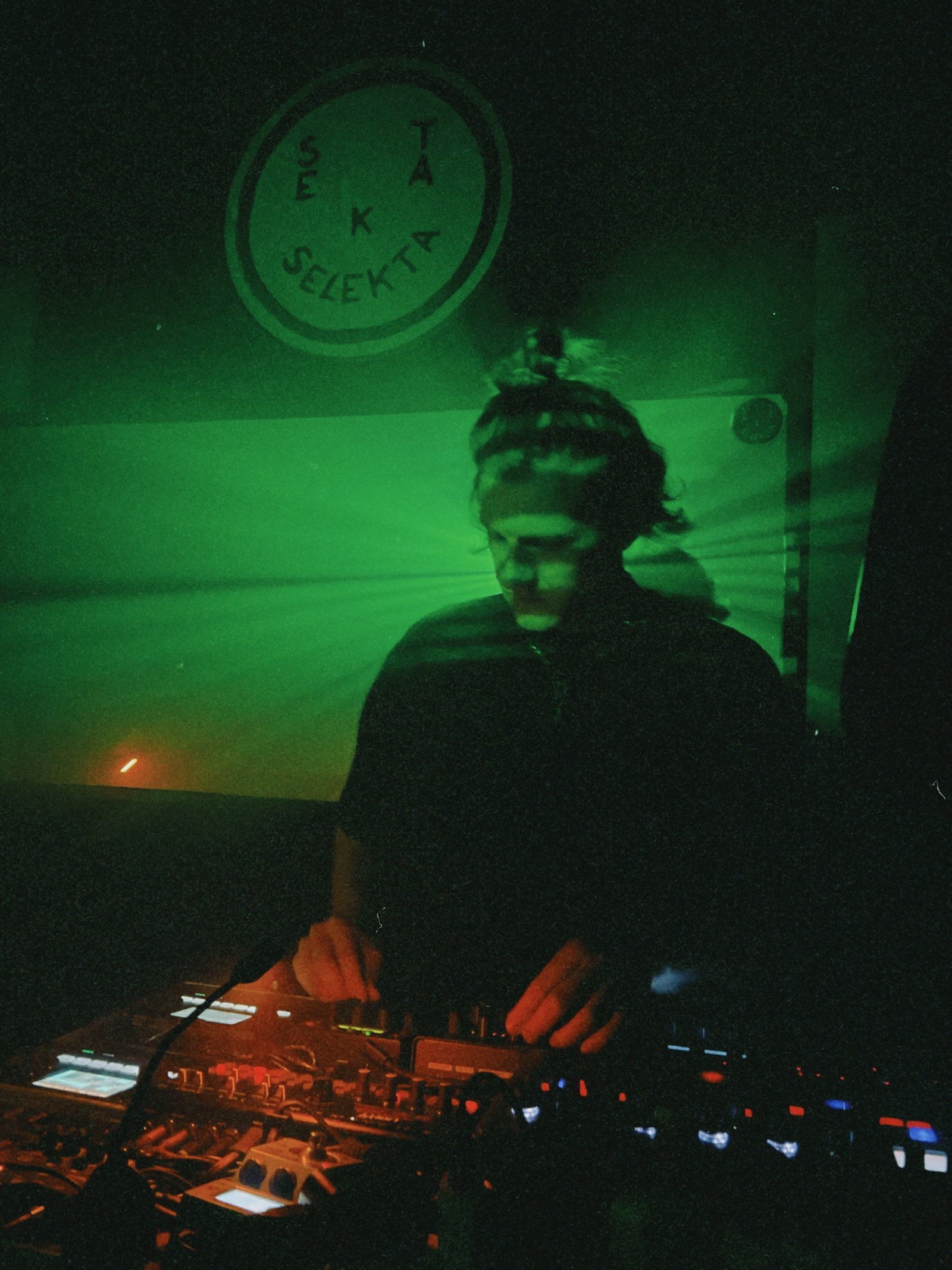
Pocket Rave in green light at Sekta Selekta
CAM_02 // sekta selekta

Press Kit

// POCKET_RAVE_ARCHIVE v2.47 — authorized media assets

/home/press-kit7 files
guest@pocketrave:~$ ls -lh ./press-kit
#FileTypeSize
01Press Kitpdf65 KB[ get ]
02Technical Riderpdf38 KB[ get ]
03Promo Video (vertical, 30 sec)mp4182 MB[ request ]
04Photo 1jpg2.1 MB[ get ]
05Photo 2jpg1.9 MB[ get ]
06Photo 3jpg3.4 MB[ get ]
07Photo 4jpg245 KB[ get ]
Pocket Rave in smoke and red light behind the gear
photo-1
Pocket Rave in green light at Sekta Selekta
photo-2
Pocket Rave performing in front of projected visuals
photo-3
Pocket Rave playing synthesizers against a pink brick wall
photo-4